My CDIA Account – Frequently Asked Questions (FAQ)
Welcome to CDIA’s Account Page. We are currently upgrading our systems and creating your NEW CDIA account experience. Your CDIA Account will be unavailable from July 29 through Aug 4 while this transition takes place.
When your account is available again, you will be prompted to reset your password the first time you log in.
We appreciate your patience and understanding and look forward to sharing the new experience with you soon.
Frequently Asked Questions
We’ve compiled this FAQ to help you navigate the new CDIA website and make the most of your account, membership benefits, training, events, and resources. Whether you’re creating a new account, accessing the webinar library, managing courses, exploring member benefits, or using the Metro 2® Access Portal, you’ll find answers to the most common questions below. If you need additional assistance, our Customer Support team is always available to help.
CDIA Customer Support at cdia_training@cdiaonline.org.
Navigating Your CDIA Account
The new website has a simplified layout designed to help users easily locate account details, resources, and tools. Key features include a top-right account dropdown, streamlined navigation, and a centralized Resource Center.
Click your name in the upper-right corner to access your account settings, password, and profile details. These are no longer on a dashboard.
Landing Page: Start here with instructions on where to go and how to access your CDIA account
Membership: Quickly see your CDIA Membership Term Dates.
Courses: View, purchase and assign courses.
Events: See which events you are already signed up for as well as CDIA’s upcoming events and webinars. You can also submit a proposal to become a speaker in our call for speaker section.
Purchase History: View and search recent purchases, and pay unpaid invoices.
Resource Center:
Resource Page: CDIA Members can view onboarding resources and benefits page to learn more about the opportunities available with membership.
- Resource Library: Access the on-demand webinar library.
- If you purchased an individual webinar, you can access the recording here.
Metro 2® Access Portal : Limited to those who fit the Metro 2® Access Policy the following complimentary resources are available to Metro 2® Access Users:
- View all upcoming Metro 2® Webinars and Events.
- View Metro 2® Announcements
- Metro 2® Access Page
- Download the most current version of Credit Reporting Resource Guide® (CRRG®)
- Ask a Metro 2® Question directly to the Task Force!
- Suggest a revision to the Credit Reporting Resource Guide®
- Metro 2® Announcements & Industry Bulletins
- Navigating the Credit Reporting Resource Guide® (CRRG®):In this 30 minute complimentary webinar which guides you through the Credit Reporting Resource Guide®.
Directories: (members only)
- View CDIA member organizations and Individuals
- Opt in to the directory from your online profile.
More: Select this dropdown to access
- Subscription Page: Quickly see your CDIA Annual Webinar Subscription Term Dates.
- Coming Soon! Committee Page: CDIA Members can view member committees and sign up.
Membership & Access
Only active CDIA members can access to additional features including:
Membership: Quickly see your CDIA Membership Term Dates.
Resource Center:
- Resource Page: CDIA Members can view onboarding resources and benefits page to learn more about the opportunities available with membership.
- Resource Library: Access the on-demand webinar library from the past year
Membership Directories:
- View CDIA member organizations and Individuals
- Opt in to the directory from your online profile.
More: Select this dropdown to access
- Coming Soon! Committee Page: CDIA Members can view member committees and sign up.
The Membership Directory is available to members only and can be found under the Directories section.
Yes, you can opt in to be included in the directory through your online profile settings.
What if I am not a CDIA Member?
Customers without a CDIA Membership continue to access the same features as in the past including access to view and edit your profile, view payment history and manage courses.
Customers can now see a calendar of upcoming events and webinars, an on-demand library for webinars they have purchased, and the ability to view and edit any events or webinar registrations.
If you have an annual webinar subscription you can also now access the on-demand webinar library right from your CDIA account!
What is the Metro 2® Access Portal?
The Metro 2® Access Portal contains specialized resources available only to users who meet the Metro 2® Access Policy requirements.
Eligible users can:
- Download the latest Credit Reporting Resource Guide® (CRRG®)
- Submit questions to the Metro 2® Task Force
- Suggest updates to the Credit Reporting Resource Guide® (CRRG®)
- Access announcements and industry bulletins
- Watch a complimentary 30-minute webinar on navigating the CRRG®
Events, Courses & Purchases
Visit the Events section to browse upcoming CDIA events and webinars and register directly.
Please note: For all upcoming webinars, you can now register your five complimentary attendee spots directly during the registration process.
You can purchase CDIA’s products directly from the website or via your account. Just click on the kiosk icon in the top right corner of your account to add products. Once you are ready to check out, click on the shopping cart to complete your order.

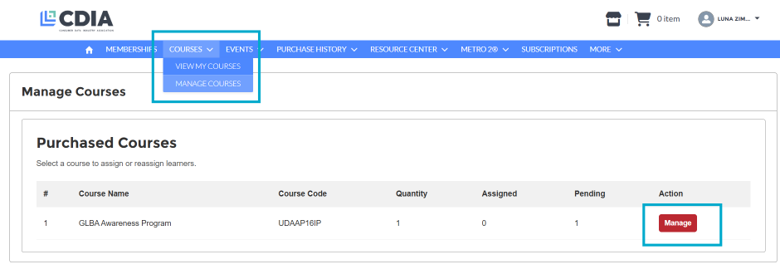
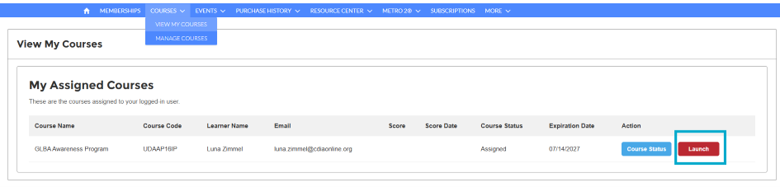
Go to the Manage Courses section to assign training to yourself or other team members if applicable. To view assigned courses and access your training, View My Courses.
You can view and search your past purchases in the Purchase History section.

You can purchase the on-demand recording of previously aired or upcoming webinars via your e-store. Just click on the kiosk icon in the top right corner of your account to add products. Once you are ready to check out, click on the shopping cart to complete your order.
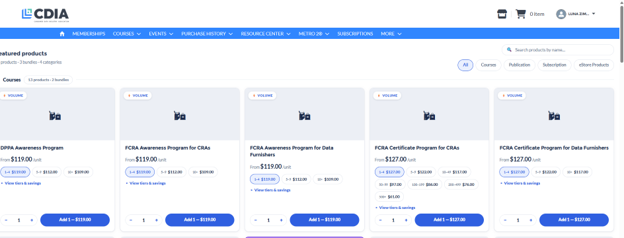
When coming directly from the main website, you will be prompted to log in. Once logged in, you will get redirected you to the AMS e-store where you can browse all products, search by category, or use the search bar to find a specific product.

When you click buy now or register now, you will land on our main e-commerce page. From there you can either:
- Scroll the tiles to find your product/event
- On the top right side type the product name into the search bar
- On the top right side, click on the appropriate course, product, etc. to reduce the number of tiles and easily find what you’re looking for
On-Demand Library
All webinar and event recordings are available in the Resource Center, which serves as the on-demand webinar library.
- CDIA Members
- Annual Webinar Subscribers
- Individual Purchasers can access the recording of the webinar or event they purchased when applicable.
If you purchased an individual webinar, you can access the recording through the resource library.
Create Your CDIA Account
You can set up your CDIA account via this link (Coming Soon!). Please review CDIA’s access policy and make sure you are eligible to create an account and access CDIA’s products and services. Simply add your name and corporate email address as well as your organization’s name and select the account type. If an organization with the same name is already set up, you will be able to select the appropriate branch on the next page. If you cannot find your organization’s account you can create a new one.
Simply type your organization’s name and select the account type. If an organization with the same name is already set up, you will be able to select the appropriate branch on the next page. If you cannot find your organization’s account you can create a new one.
If you are not sure whether your organization location is the headquarter (HQ) or a branch organization, please check in with your supervisor or utilize a search engine (“Your organization’s name + Headquarter”)
Account creation requires a corporate email address and an associated company website with matching domain. In general, personal email addresses are not allowed. Exceptions may be considered upon request and are subject to review and approval.
Account creation requires a corporate email address and an associated company website with matching domain. If you are using a personal email address or your email address does not match your company website, your account will be reviewed by CDIA staff to determine eligibility. Exceptions may be considered upon request and are subject to review and approval.
Click your name in the upper-right corner of the website. From there, you can access your profile, update your password, and view .
You can identify your HQ by clicking your name in the upper-right corner of the website and select My Account. Your HQ will show under Parent Account.
Troubleshooting
For assistance with orders, training, event registration, or general account inquiries, please contact our Customer Support team at cdia_training@cdiaonline.org. We are happy to assist with any questions and ensure you have a smooth experience.
Some content is only available to certain user types, such as members, annual webinar subscribers, Metro 2 access users, or individuals who have purchased specific items. If you believe you should have access, please contact CDIA’s Customer Support for assistance.
In general, CDIA members are consumer reporting agencies that compile consumer reports as defined in Section 603(d) of the Fair Credit Reporting Act primarily for credit reporting, mortgage reporting, tenant screening, employment screening and check services purposes. If one of the descriptions applies to your organization, please click here to get started.
To view CDIA’s attendance policy, please click here.